Bible Bloom’s Daily Bible Challenge

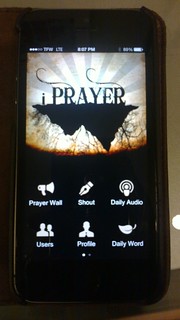
Bible Bloom homescreen
We are very late in getting this up, but given the site issues and just how popular our review of Bible Bloom has been, its about time that we make a note about something new happening with Bible Bloom called the Daily Bible Challenge.

Now, you’ve been a part of reading plans before, but this one offers a bit more. And combined with the pleasant UI of BIble Bloom’s app, could make for a neat reason to use this Bible app versus to others.

Here’s more about the Bible Challenge:

The Big Idea
The Bible Bloom Daily Challenge is a journey that will stretch and strengthen your faith in Jesus Christ. The concept is very simple but the impact is profound: each day we’ll issue a new challenge to experience Jesus. You can try it, skip it, or share it. Some challenges will be easy and others will stretch you. But every challenge will grow your faith, glorify Jesus, and advance the kingdom of heaven.

What is even more exciting is that Christians all over the world will take the same challenge at the same time. Now imagine the revelation of Jesus that will enter your life through a daily challenge multiplied by tens of thousands of Christians all over the world. Together we will ask for a greater revelation of Jesus, pray against injustices like human trafficking and abortion, bless Israel, and activate our faith through evangelism. There are 365 inspiring, thought provoking, and fun challenges to stretch your faith.

Read more about the Bible Bloom Daily Bible Challenge

Sounds like something worth taking part in? Good stuff. Let’s sweeten the deal for you here.

Bible Bloom has given us two promo-codes that we’ll give away to anyone who wants to try out the Bible Bloom app. Its only available on Apple’s iOS devices (made for the iPhone, but will work on the iPad) so sorry about that end of things. But for those of you looking to try something a bit different, or get a friend or family member to try something different, this is a great idea. If you are interested in the promo code, shoot us a message via Twitter including BibleBloom in a hashtag (for example, “hey @mobileminmag, I’d like to try that #BibleBloom app”). If we get a large number of tweets, we’ll choose at random; if not, we’ll just go by the responses. Let’s say that we give about 3 days to get a response from you all on that.

Until that point, stay tuned to MMM for more bible app reviews, commentary, or other potential giveaways.

Psst… Pass It On

Its been a bit of a slow news week, but there are always notes being passed this worth passing along to you.

  • WorldBibles is a website that has a collection of text and audio Bibles in a few thousand languages. Much of the content is sourced from other websites, but its all collected in one place with a decent search facility
  • In an article over at Fast Company, its talked about why good intentions aren’t enough to make people use your app. That’s a lesson that many in the faith space don’t want to hear (that there’s not as much demand for this content as we want folks to believe). The solution is in part better marketing, but another part building stuff that matters before building the rationale for traditional messaging
  • Also at Fast Company, a article looks at problem solving electronic toys for kids and how one solution points at ways that existing software and hardware can be better purposed for engaging brains and activities… not just entertainment or passive learning as is usually the case
  • Continuing down the kids meme, the Huffington Post looks at tech in schools when kids are able to bring their own device and how that fosters different expectations and results in terms of the tech and lessons from those kids. Lessons here for missions work as well as understanding the educational advantages and constraints of mobile (in ministry).

There are a good deal more articles out there. Much of the week’s notes have already been passed along via Twitter (use the hastag #mobmin to see these). What news and notes have you found worth sharing?

Mobile and Disruptive Events

As the USA has witnesses in light of the Boston Marathon bombing, there are some signifiant failings towards mobile that tend to rear their heads. And certainly there are things that can (and won’t) be done to address that. Fast Company went through a litnay of possible ways that carriers have addressed the issue of call/data/messaging volume during emergencies in a recent article:

…Mobile networks have bandwidth that is more than sufficient 99% of the time. However, when disaster strikes, the decentralized nature of the network means that whole geographic regions can be knocked out by increased call volume. Whenever the generous-but-finite bandwidth at carrier site buildings are strained, users are prevented from making voice calls. Because SMS text messages take up far less bandwidth, mobile carriers instead encourage users to text message each other. As Pica put it to Fast Company, “text requires less dedicated real-time capacity than voice. Data networks including LTE and EVDO were not impacted due to the nature of the way data systems are used.”…

Read the rest of Why Your Phone Doesn’t Work During Disasters and How to Fix It at Fast Company

As much as I liked the idea of the article, and have thought about similar here in light of the recent bombings in Boston and Bagdad, I don’t necessarily think of the nature of the network in the same way. In emergency situations, I think of communications channelling going from utility-controlled to P2P-types of methods. We talked about the quick-setup and versatile voice/data network put up at the Burning Man festival each year. And have also talked about the mesh-networking-based product Serval – which acts a lot like the way Skype used to work (several nodes connecting to each other rather than all pointing to a single node).

In many of the conversations about mobile ministry in the missions and security spaces, this idea of P2P communications gets a slightly larger share of attention (from IT folks) than it does in the general conversation. Manily because our normal behaviors have been shaped to expect utilities to be managed from a regional or govermental central point. And indeed, the governance and poolicies set on those levels creates a quality of service level that just isn’t matched by other methods. However, when there aree emergencies, this central-focus becomes a failure point to which its literally a tech and behavior shift to do something different.

In some respects, I’m proposing that we start doing things like sharing communications over Bluetooth (passing notes, contact cards, events, etc.) in normal situations so that when emergencies do come up such as Boston/Bagdad that we are more or less equipped to keep going, rather than feel like the tech limits us to wait until a gatekeeper says its ok to connect in a specific way.

The “Other” Way to Transfer Content to Mobiles

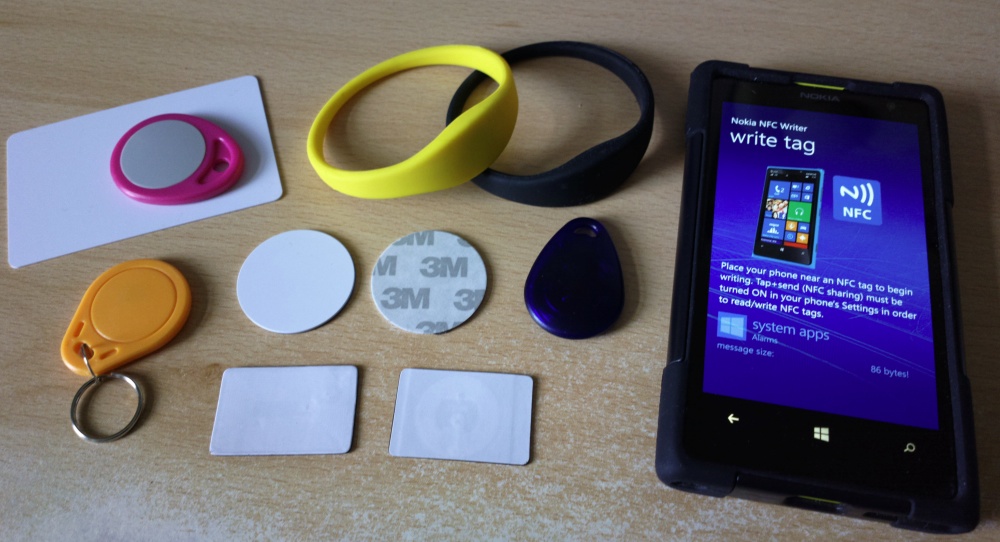
A few weeks ago, I did a bit of a mobile device upgrade. I found a very nice deal on a Nokia N9 and pulled the trigger. One of the reasons for getting this device (despite its age and the non-Android/iOS aspects of it) was the inclusion of NFC (Near-Field Communications). NFC is a radio transmission protocol that’s used to instigate wireless data transfers. It is too small a wave to do the transfer for all but the smallest pieces of data. But, it can be used as a trigger to enable Bluetooth or Wi-Fi to take over the transferring of files and other data between devices.

This ability to instigate the transfer of data between devices is something that comes across the #mobmin field pretty often. In some of the contexts, we’re asked about P2P (person to person) media transfers because the use of an Internet service to facilitate that is not always so economic or practical. So, the use of Bluetooth, a shared, offline Wi-Fi hotspot like AirStash, or even turning to a multimedia card reader (by itself or embedded within a mobile or laptop) becomes the method that people employ. NFC technology within mobile devices can help to simplify the process of doing these transfers. The key here to to understand what all a device can transfer, and then making sure that you’ve setup your device accordingly for sending or receiving.

Steps to Use NFC (if your device has it)

  1. Make sure that NFC is turned on (you will probably need to go into Connectivity settings in order to set this on)
  2. Make sure to enable the confirmation of a transfer (this is a security measure to protect your device and the information on it)

After that, its as simple as navigating to the content that you wish to share, clicking on Share, setting your device back to back with another mobile that has NFC, then tapping the screen and starting the sharing of the content. The other device has to have NFC for it to work like this. Otherwise, you will want to use Bluetooth pairing in the conventional manner in order to share the content (turn on Bluetooth, make both devices discoverable, select the content you want to send, then send it).

Samsung’s S-Beam and Other NFC Implementations

This article was sparked by a reading of How to Use S-Beam over at Android Authority. S-Beam is a Samsung-branded implementation of NFC that not only uses Bluetooth, but can also use a variant of Wi-Fi called Wi-Fi Direct. When using S-Beam, the idea of transferring videos to other Wi-Fi Direct devices makes sense because it uses the much larger pipe used for Wi-Fi, instead of the smaller Bluetooth channels.

NFC is also usable from static boards such as business cards and billboards. Going along with Samsung’s Galaxy III campaign in the USA, there are many billboards in places such as malls and airports where Samsung invites the Galaxy III (or any Samsung NFC-equipped device) owner to tap the ad and get some kind of application, news, or media content. The best part about this kind of activity is that nearly anyone can purchase a “blank” NFC card and then use either the mobile device or an attending PC to program it for sharing info in a similar manner. Samsung calls their programmable tiles TecTiles. Nokia has a whole suite of programming documentation on the subject for Symbian, MeeGo, S40, and Windows Phone projects.

NFC can also be used in situations such as making identity and access tokens (really cool when you see this: tap the device against a panel on a door, hear the door unlock, then walk in). There are plans to doing things like this for automobiles, but already we are seeing this specific implementation in schools and businesses. There are even NFC enabled phone accessories that do everything from charging a device on a pillow, to playing music through a wireless boombox.

Conclusion

You don’t need to make a web service in order to make something mobile that can get from one device to another. If your device doesn’t have a memory card slot, you can use Bluetooth or Wi-Fi to make the transfers. NFC is a protocol that makes it easier to start those connections. Many new smartphones have NFC (Samsung, Sony, and HTC models on the Android side, Nokia and HTC on the Windows Phone side, some of Nokia’s Asha phones have it, and the new BlackBerry Z10 and Q10 devices do as well) and most will be able to at least transfer content between them.

The days of saying “I have to wait to email it to you” are done, wouldn’t you say?

[Video] Community Voices: Digital Literacy Project

Watch Video – Community Voices: Digital Literacy Project

For the past weeks, I’ve been involved with a rag-tag group of people around Charlotte (NC, USA), including a few journalists (Street Corner Prophet) and a group of students who participate in Central Piedmont Community College’s STARS Program. We started in talking about how to enable senior citizen to share their stories using social media, and what this has evolved to is a series of workshops on mobile and social media technologies designed (a) to enable [seasoned] seniors to use these technologies to tell their stories, and (b) to utilize the passion, energy, and technical acumen of college students to help these seniors while also learning some of the challenges with tech from another perspective.

The video linked here is the first of these series. Besides showing again some of the implications of mobile and technology, there’s also that aspect of seeing what it looks like when we place #mobmin in a posture of serving others. Now, if this is a program that you would be interested in for a mix of college students and seniors, get in contact with us, and let’s see what can be done at this intersection.

An Independence of Faith

Of the positives and negatives of going mobile, one of the points that’s very rarely talked about is the idea of a faith that’s independent of the tethers of traditional visitors, but a greater grasp on the interdependence of one to survive because of the needs of the faith. If you will, does the tech and what it enables put us in a place where the past actions of living out faith only matter to store of the faith? Or, does it matter more that we are connected, with theology coming from that, rather than behavior and doctrine?

It was this article that sparked that thought:

…Where it gets interesting, though, is that independence isn’t necessarily being foisted on people. Of those who went independent in 2012, 57% chose to. Even more telling, whether these independents pursued this path of their own accord or not, only 13% intend to go back to traditional employment. Certainly that has been the case for me. After leaving Merrill Lynch, I co-founded Rose Park Advisors with Clay Christensen, veering ever closer to independence. A start-up environment may be grueling, but you are more your own woman — or man.

This trend cuts across all demographics. Millennials (Gen Y), ages 21-32, for example, 40% say they’re likely to choose independence of their own accord. 58% of Boomers (ages 50-66), are choosing independence. And Gen X (33-49) is the most likely to choose independence — 68% of those who have gone indie are there by choice rather than the result of job scarcity or loss. You can see this growing appetite for autonomy reflected in the burgeoning number of books and blogs looking at the meaning of work and life, from Umair Haque to Cali Yost to Gretchen Rubin to James Altucher…

Read rest of Independent Work Might Be Inevitable at the Harvard Business Review blog

If independent work can be sparked by tech, then can an independent faith be indicated by the same?

The Mobile Continent

Whenever we read about those things mobile, it’s always country (USA and China) or region (Europe or Central & South America). Unfortunately, when the conversation talks about Africa, it is like the continent is treated like a country, it some region so far removed from normalcy that what happens in mobile is novel. Thankfully, not every perspective is like that. Thankfully, we get solid pieces like this:

…Context is important. In the 1980s and ’90s, computer and communications technology took hold in the West. But in Africa, if you ran a business, say in Kenya’s cities or up-country, you were hard pressed to communicate efficiently with your suppliers. Lag time between customer demand and inventory levels was legendary. You could show up at one auto store to find that the owner had a mountain of supplies that would sit gathering dust for the next 10 years. Or you could show up at another auto store just 10 miles away and find that all its inventory had been snapped up and nothing was coming in for another two months…

Read the rest of The Mobile Continent at the Stanford Review

What games your views of mobile, and is it grounded in reality, or perspectives too broad to be applicable?

Activate & Converse

Bible Bloom screenshot
Going further down the line of thought about the implications of mobile in ministry, we would do well to pay attention to some of the lessons that are being unveiled on the side of mobile marketing initiatives. One of my favorite points of research and insight comes from Mobile Groove (formerly, MSearchGroove). In one of their recent published pieces, they go into two aspects of engaging people with mobile and driving the experience into something that can be better monetized. Here’s a snippet of the article:

…Whether you are an individual app developer poised to take your good idea to greater heights, or a company mapping out a more comprehensive engagement strategy with mobile apps at the center, it’s both exciting and terrifying to think about the opportunities ahead. But don’t limit yourself to strategies that drive, measure and monetize app installs. There are also huge opportunities around app re-engagement.

Don’t think this is just for the benefit of your customer. There is also a hard-nosed business model at play here because campaigns that only count app installs are on the way out…

Read the rest of Mobile App Developers: Use Messaging To Activate Users, Monetize Engagement at Mobile Groove

Remember how we talked about that mobile is made up of three parts: devices, services, and experiences. Its in the last piece experiences where you gain the sticky that mobile becomes. Its much, much more than having a library of content – seriously, if the content is only addressable to a small audience, you are carrying essentially a lot of dead weight. Its more than having something shiny that has the same features of a market leader, but your own twist on it. Whatever device accessory, application, or service you develop needs to also have the experience of what it means for someone to come back to it.

I’ll use Bible Bloom as an example. They have a pretty Bible reading app, and in that core it offers nothing more than other Bible readers (there are literally thousands of Bible readers out there). One of the ways they separate themselves from the rest is in using the Notification’s component of Apple’s iOS to give you a verse if you’ve not opened the app in some pre-set time (1 or 2 days, or a week). They activate the application at a point of relevancy (“are you meditating on the Scripture?” Joshua 1:8), and then opening it is the conversation you take with their application/service.

I know that some of you have been long into the business of creating content and then marketing to people. With mobile you have to get used to talking to them. Are you ready for that kind of reality with faith in this space?

Quickie on QR Codes in Ministry

MMM logo with QR Code to RSS feed
Its probably not great taste to keep turning emails into content, but this is another one of those cases where it just makes sense. Especially if you are interested in using QR Codes in ministry.

QR Codes in Ministry

QR Codes have been used for more than a decade in Japan and SK. Essentially, its an old technology now, as much so that even many on the side of ministry and tech have essentially moved past simply using QR codes and integrating them into fuller, mixed media efforts.
 
We’ve published several articles on the subject. As for a getting started guide, there aren’t any – you can go to several websites to create QR codes such as Mobile Barcodes, Kaywa, and even Google. From there, implementation takes on whatever makes sense for your organization.

As for applications of it, there’s been QR codes used in tracts, business cards/flyers,cover art and bulletins, and even bibles. If you are doing to do something useful with it, make it distinct, and do more than simply point to a link. The effects of these kinds of augmented digital expereinces tend to have effects beyond what we design.

To that end, we enjoy working with QR codes and other trans-meta media tech. There’s always a neat conversation that develops when we are able to instigate different behaviors by the way we use mobile tech.