Monthly Archives: April 2013

Creating a Mobile & Online Classroom

I’m in the midst of creating an online class, and specifically doing some edits for the content that’s already been created. The instructional designer for the school I’m working with has gotten back to me with several notes, and much of it are items that probably wouldn’t have been as hard to manage if I weren’t in the position of juggling several computing platforms at once in order to produce this. Now, let me note, this isn’t a knock to that school, or online classes in general, but it is an observation of some of the hurdles that tend to happen when governance doesn’t keep pace with the instructor, or the lesson.

The context of the class is that of creating a mobile ministry. In five sessions, I go through a summary of much of the work that’s been done here at MMM for the past 8 years (yes, its really been since April 2005 that the online aspect of this magazine has been in existence). For this class, I’ve got to handle working through a learning management system (a content management applications specifically made for online education) called Moodle. I’ve also got to create content inside of the enterprise-favorite, Microsoft PowerPoint. Inside of these containers I’ve got the requirements to create engaging and interactive content – and pretty much assume that all of it will be consumed session-by-session and while folks have little to nothing else on their plate. I’m not a fan of that methodology if you couldn’t tell.

At this point, I’ve got to redo a lot of content, and all of it is happening through the use of several mobile/connected tools:

  • my Nokia N8: serves as the audio and video recorder (excellent in both of these capacities)
  • my Kindle Fire HD and 1st gen Apple iPad tablets point towards Evernote and Microsoft Office Online to create the text-based components of this class – the latter doesn’t do so well on tablets
  • Dropbox for sharing files between my devices and with the school I’m working with
  • a personal wiki (using TiddlyWiki) on my Nokia N9 (different device) where much of the content generation, resource collection, and management of all these parts has happened
  • And if that’s not fun enough, a borrowed PC to do the parts with Office Online that are just flat out unusable on these mobile devices

One could read all of that and get the impression that creating a mobile and online course is a lot of work and takes a ton. But, I don’t think so. In fact, I’ve done my best not to push back against the school that I’m working with in order to get a better idea of how to take my mobile-mainly approach and fit it within these constraints. That said, this could be done in a much easier way. For example:

  • There would be one and only one document, Fargo.io an online outlining web app that connects to Dropbox accounts -created by the inventor of RSS (and oldest blogger) Dave Winer
  • Audio and video components would be linked using the Dropbox “share link” feature but these would be created on a single mobile device
  • Group discussions occur via Twitter (only) with access to the tweet stream restricted to the in-class participants only (also helps that Twitter is accessible via SMS, web, and email digests)

That doesn’t sound like much, but once you have your outline (as a professor), then there really isn’t much more to a class other than sparking the discussion(s) that lead to knowledge development/transfer.

I’m not done the edits that I have in place here, but I’m thinking that I might be up for doing something like this for the next presentation or course that I’m asked to lead. Seems like too much of a hassle to be using this tech the way that I do, but then have to take several large steps backward in order to teach people the lessons I’ve learned – content shouldn’t be locked, should be accessible to the greatest number of people, and should be tailored to their unique experiences with its application. I don’t know that content management systems, or governance really enable that right now. But I think that we can get there if we have these kinds of examples that simplify what can be done, then get out there and do it.

Tech and Presence

ConvergeSE Friday sessions

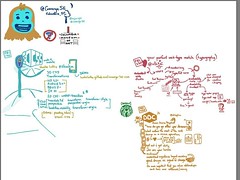
This past week, I was able to attend the ConvergeSE Conference. But rather than being there in a capacity of thought-leader, presenter, or even regular attender, I was there as a sketchnote artist. Sketchnotes are drawings that include text and graphics that are done during the course of attending meetings, bible studies, workshops, or nearly anything where you have lots of information and its just better to engage both sides of your brain while listening. I listened to the presentations, but kept my finger more or less on the pulse of what was happening around me. Being around the Columbia Museum of Art and their collection tends to make you a bit more reflective.

ConvergeSE is a conference where it seemed that in part, many web developers, graphics designers, and mobile/web designers were there to connect and get a refresh. The talks that I attended were techie in part, but mostly seemed to serve the purpose of helping the creatives who were there to refresh a bit in an industry where not only things change quickly, but its easy to be distracted by things that don’t matter as much.

What was interesting is how you could parse the attendees into two groups: those who connect and those who were present. The connectors I saw talking often to different people and moving from place to place a bit faster than I. The folks who were present were a bit more solitary in sections, but seemed to just float along the stream catching connections as they happened, and embracing Columbia, SC when it poked different. The tech that connected these two groups usually came in some Apple-tinted flavor, but it always seemed to have something mobile nearby.

I found myself at one point sitting outside at one point just listening. I followed one group to a point, then moved my attention to another. I was grabbed by a few familiar faces, and later dropped off to be engaged by faces that might be more familiar in my future. I watched how people wandered between meetings, and how a few others spent the time right before a speaker started setting up their laptop/mobile or grabbing another quick bite. Listening, sketching. And generally just embracing something that doesn’t seem to be a part of design and development practices for many… contemplation, or reflection.

I got a lot of ideas about how to not use paper laynards, how to keep devices charged wirelessly, and how those beautiful paintings should have come home with me digitally. I thought about how to remain connected with a few new persons, and was sparked to create something for the church community here that isn’t always afforded… a chance to express and entreprenural spirit.

Connected technologies afford us a lot of things. But, if we don’t remain aware of the presence of how our lives intersect with others, and the opportunities that open up to us in that, then this tech is nothing more than just a connect to a stream. A stream where others just pass around. But we are there with a life jacket or directions to shore… being a presence towards something more than just another way to connect.

Still Debating


Is your organization still debating whether its worth having a mobile app or a website? And probably for the following reasons:

  • Our organization has finally gotten on board with the idea of being present on mobile
  • We’ve finally gotten the funds to build a mobile app, just trying to figure out how now
  • We’ve got a mobile website but no one visits it
  • Our regular website keeps getting fewer and fewer visits and we need something new

Ok, I get it. That’s a worthy debate. So let’s make it easy to answer:

I get it. Some folks are still debating the mobile question. Hopefully, the items in this post will help you take some posiitve forward steps towards answering the needs of your org, audience, budget, and mission.

Bible Bloom’s Daily Bible Challenge

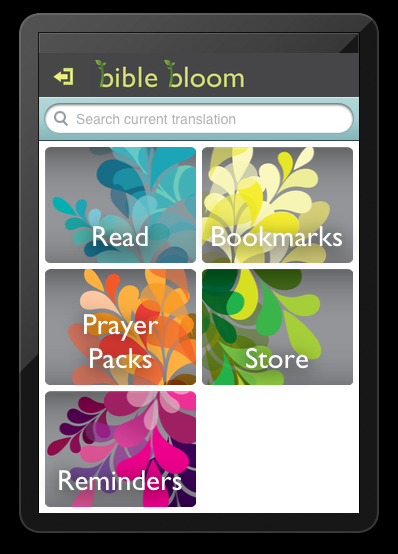
Bible Bloom homescreen
We are very late in getting this up, but given the site issues and just how popular our review of Bible Bloom has been, its about time that we make a note about something new happening with Bible Bloom called the Daily Bible Challenge.

Now, you’ve been a part of reading plans before, but this one offers a bit more. And combined with the pleasant UI of BIble Bloom’s app, could make for a neat reason to use this Bible app versus to others.

Here’s more about the Bible Challenge:

The Big Idea
The Bible Bloom Daily Challenge is a journey that will stretch and strengthen your faith in Jesus Christ. The concept is very simple but the impact is profound: each day we’ll issue a new challenge to experience Jesus. You can try it, skip it, or share it. Some challenges will be easy and others will stretch you. But every challenge will grow your faith, glorify Jesus, and advance the kingdom of heaven.

What is even more exciting is that Christians all over the world will take the same challenge at the same time. Now imagine the revelation of Jesus that will enter your life through a daily challenge multiplied by tens of thousands of Christians all over the world. Together we will ask for a greater revelation of Jesus, pray against injustices like human trafficking and abortion, bless Israel, and activate our faith through evangelism. There are 365 inspiring, thought provoking, and fun challenges to stretch your faith.

Read more about the Bible Bloom Daily Bible Challenge

Sounds like something worth taking part in? Good stuff. Let’s sweeten the deal for you here.

Bible Bloom has given us two promo-codes that we’ll give away to anyone who wants to try out the Bible Bloom app. Its only available on Apple’s iOS devices (made for the iPhone, but will work on the iPad) so sorry about that end of things. But for those of you looking to try something a bit different, or get a friend or family member to try something different, this is a great idea. If you are interested in the promo code, shoot us a message via Twitter including BibleBloom in a hashtag (for example, “hey @mobileminmag, I’d like to try that #BibleBloom app”). If we get a large number of tweets, we’ll choose at random; if not, we’ll just go by the responses. Let’s say that we give about 3 days to get a response from you all on that.

Until that point, stay tuned to MMM for more bible app reviews, commentary, or other potential giveaways.

How Do You Use Study Resources

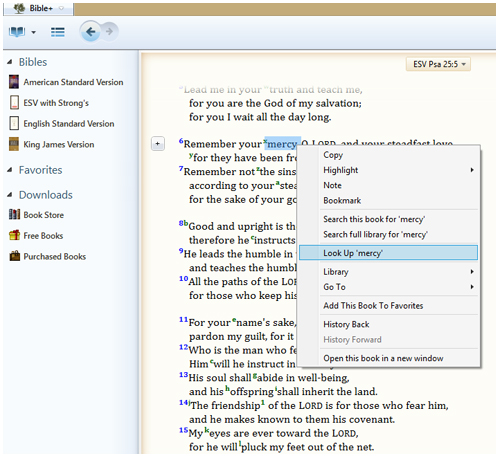
screenshot of Olive Tree Bible Study App when using concordance resources
The other day while going through email, I noticed a newsletter from the good folks over at Olive Tree Bible Software. As I read, I saw a neat piece in there about how to use a concordance with their software. Here’s a snippet:

…As you can see, the Olive Tree Concordances are much more than a list of cross references for each word in the Bible. With dictionary information tied to the original language, these resources are valuable tools for Bible study. Each concordance comes with a copy of the Bible in the selected translation…

Read the rest of Using A Concordance in the Bible Study App at the Olive Tree Blog

That piece got me thinking back to how I used to use print resources, then print and web, and then later web and mobile resources in order to do my studies. A good deal of the work that went into feature suggestions and the design of Palm Bible+ app which accelerated my travels in this space. It was very important then to not just have access to the resource, but have it in such a way that it didn’t interrupt the reading flow, but was there when needed. Now then, we did things with the PalmOS Graffiti system, and even the keyboard on Treo devices to make that happen. These days with touch and more consistent connectivity, designing these resources into an app is a bigger challenge.

Even with that challenge, its still a suitable flow of use. So, let’s open question that titles this post (how do you use study resources) with a few qualifiers:

  • For those of you who might use commentaries, concordances, etc. in your private reading, how do you do it? What could be done better?
  • For those of you who use those resources while teaching, what kinds of challenges do you run into either from the side of teaching or the side of sharing the sources of that info with students?
  • For those wh might use these resources to teach, but don’t share them with your students/audiences, why?

There you have a few ways to frame an answer. Let’s hear what you have to say towards using study resources, especially with your mobile-enabled audiences.

How Would Jesus Use (Compter/Connected) Technology

Was browsing over at Symbiota and came across a really interesting question worth discussion on several levels: How would Jesus use technology?

…I think Jesus would have used the technology in a couple of ways. One, I think because we see Jesus working primarily with his group of 12. He talk crowds, he healed and he walked through cities and really impacted a lot of people. But he concentrated, he put a lot of his leadership training in his 12. So I think Jesus would have really used technology to train his core leaders to give them the tools. I think of the story when Jesus send 70, 2 by 2. I can imagine, you know, hypothetically if I can use my imagination them being in the field and asking Jesus the question and having Jesus on Skype or on Google Hangout and he’s saying, OK this is how I would do the situation if I were you.

So I think he would primarily use it in training his core leaders but also because he was impacting so many people, he would make sure that the gospel was broadcasted as far and as wide as possible…

Read the rest of the Interview with Pierre Quinn over at Symbiota

Personally, I don’t know that Jesus would have used tech in that manner. At least not when it came time for ministry. If we look at the text, we see very little of the carpenter in the text, but we do see the effects of his work in terms of social movements, behaviors, and responses.

Its an interesting one, and makes us really think about how we navigate and move in this space. Perhaps its less about the tech, and more about the process after the tech we should pay attention to?

Disclaimer: Symbiota is one of several partner groups to MMM. Interested in partnering with MMM?

Securing the Doors Around Here

Update: the HTTPS piece talked about here has been turned off for the moment as it was the reason for the downtime today. It will come back. So please take note of the below as a bit of a preemptive note.

As if there isn’t enough news going around these days about data, access, and security, one of the more recent pieces that has sounded an alarm is the news of a botnet (automated scripts that act like tiny computers within programs) that is aiming to use WordPress-powered blogs for generally making a bit of nasty noise around the web. Since MMM is among many faith/tech sites that uses WordPress, we’ve been going about adding some measures of security to the site here – and its noticable that it will have an effect on how you consume information around here.

If you are coming here direcly by typing in the URL (as about 45% of our visitors do), you will have noticed a note about the security certificate for the page, and then you would have noticed that we are now running the site with SSL enabled. You notice this specifically by the https:// that is in the URL field of this page. That’s the biggest piece of friction and has actually resulted in about 2/3 of the traffic that we normally see in that organic fashion going away. Crazy drop I know, but if it means that the information here remains usable in a secure manner, that’s going to have to be the case.

Enabling SSL, along with a few other features behind the scenes, happened to be enabled by the use of the WordPress plugin Better WP Security. Better WP Security enables all kinds of neat features that you would normally need to know a bit about network security to implement, while also adding some semblance of sanity through log reviews, IP blocking, and site database backups. Being that MMM is no stranger to strange visitors, this is a very important measure of security that we needed to implement, and frankly probably comes at a great time. Our server admin also considers it a good thing to add, even though its not necessarily the route they would have gone with (they are admins, they know things too).

The SSL tweak has broken pages for a number of visitors. The biggest break is actually on the side of our RSS feeds. You will need to check your feed address – its needs the https:// then mobileministrymagazine.com/feed in order to work properly. Yes, I’m still using Feedburner (feeds.feedburner.com/mobileminmag – I think that’s it), but if that service was also to be cut off by Google, you need to know how to get our content in the most direct way as possible.

For those of you not coming to MMM through any of our apps/experiments, you can still get to MMM content through our HTML5/jQuery web app, or by the (only?) mobile ministry portal out there – MobMin.Info. Either one puts our content in front of you in a mobile-friendly, quick, and contextually-relevant manner. Who knows… we might just let those stay as the entry points while the rest of the web works itself out.

Other than that, content will still flow to and through our Twitter feed (@mobileminmag). And there will also be a slew of content posted by others at Twitter, Pinterest, and other social media outlets if you search for #mobmin. There’s a growing body of conversations and works happening, and MMM is proud to be a part of that conversation.

I’m sure that our folks who work in the mobile security space will have more to add to this thread, and that conversation remains open here and other places. If anyone has continued advice for MMM, please don’t hesitate to drop us a line.

For some other tips on how to secure your WordPress blogs, visit this recent article at Internet Evangelism Day – with IE Day coming up in a few days (April 21st) this makes even more sense to be on top of for your ministry communications.

Psst… Pass It On

Its been a bit of a slow news week, but there are always notes being passed this worth passing along to you.

  • WorldBibles is a website that has a collection of text and audio Bibles in a few thousand languages. Much of the content is sourced from other websites, but its all collected in one place with a decent search facility
  • In an article over at Fast Company, its talked about why good intentions aren’t enough to make people use your app. That’s a lesson that many in the faith space don’t want to hear (that there’s not as much demand for this content as we want folks to believe). The solution is in part better marketing, but another part building stuff that matters before building the rationale for traditional messaging
  • Also at Fast Company, a article looks at problem solving electronic toys for kids and how one solution points at ways that existing software and hardware can be better purposed for engaging brains and activities… not just entertainment or passive learning as is usually the case
  • Continuing down the kids meme, the Huffington Post looks at tech in schools when kids are able to bring their own device and how that fosters different expectations and results in terms of the tech and lessons from those kids. Lessons here for missions work as well as understanding the educational advantages and constraints of mobile (in ministry).

There are a good deal more articles out there. Much of the week’s notes have already been passed along via Twitter (use the hastag #mobmin to see these). What news and notes have you found worth sharing?

[Video] April Mobile Minsitry Notes

As we’ve done the past months, here’s a video(cast) about those things related to mobile ministry. We talk a bit about the Mobile Ministry Forum, as well as some newly acquired tech and how that’s being used here at MMM. Take a peek and let us know what you think of these videos.

Watch previous months videocasts:

Also, you can check out other videos about mobile ministry.

Mobile and Disruptive Events

As the USA has witnesses in light of the Boston Marathon bombing, there are some signifiant failings towards mobile that tend to rear their heads. And certainly there are things that can (and won’t) be done to address that. Fast Company went through a litnay of possible ways that carriers have addressed the issue of call/data/messaging volume during emergencies in a recent article:

…Mobile networks have bandwidth that is more than sufficient 99% of the time. However, when disaster strikes, the decentralized nature of the network means that whole geographic regions can be knocked out by increased call volume. Whenever the generous-but-finite bandwidth at carrier site buildings are strained, users are prevented from making voice calls. Because SMS text messages take up far less bandwidth, mobile carriers instead encourage users to text message each other. As Pica put it to Fast Company, “text requires less dedicated real-time capacity than voice. Data networks including LTE and EVDO were not impacted due to the nature of the way data systems are used.”…

Read the rest of Why Your Phone Doesn’t Work During Disasters and How to Fix It at Fast Company

As much as I liked the idea of the article, and have thought about similar here in light of the recent bombings in Boston and Bagdad, I don’t necessarily think of the nature of the network in the same way. In emergency situations, I think of communications channelling going from utility-controlled to P2P-types of methods. We talked about the quick-setup and versatile voice/data network put up at the Burning Man festival each year. And have also talked about the mesh-networking-based product Serval – which acts a lot like the way Skype used to work (several nodes connecting to each other rather than all pointing to a single node).

In many of the conversations about mobile ministry in the missions and security spaces, this idea of P2P communications gets a slightly larger share of attention (from IT folks) than it does in the general conversation. Manily because our normal behaviors have been shaped to expect utilities to be managed from a regional or govermental central point. And indeed, the governance and poolicies set on those levels creates a quality of service level that just isn’t matched by other methods. However, when there aree emergencies, this central-focus becomes a failure point to which its literally a tech and behavior shift to do something different.

In some respects, I’m proposing that we start doing things like sharing communications over Bluetooth (passing notes, contact cards, events, etc.) in normal situations so that when emergencies do come up such as Boston/Bagdad that we are more or less equipped to keep going, rather than feel like the tech limits us to wait until a gatekeeper says its ok to connect in a specific way.