Monthly Archives: September 2012

Impractical Mobile Ministry

In contrast with yesterday’s post, I want to open the can of what impractical mobile ministry looks like. I don’t just mean in respect to what works and what doesn’t, but also a state of mind that might not be conductive to being a suitable representative of Christ with this tech.

Ironically, I was driven to think of this as I sit trying to edit my personal wiki on my mobile device, as it is connected to a 42in HD TV while it plays music (locally stored on my mobile) while showing a slide show and also serving as a Wi-FI hotspot to the iPad that I am typing this on. Surely, a lifestyle where mobile is used like this has to throw some questions into the hat towards what is or isn’t practical to consider with mobile ministry. Perhaps I am stretched a bit too far out there in this instance. Are there others?

Practical Mobile Ministry


When my recollection of history was a good bit clearer, we could have a discussion about the discussion of ministry where one part talked of the need for minsitry to be embedded within the practical needs of the community. Things such as establishing schools, businesses, hospitals, etc. are seen to go hand-in-hand with the proclamation of the Gospel. The other side of the discussion presents the proclamation of the Gospel as the do-first mandate. Where its more important to declare and convince the community on the perils of living without Jesus, and then letting that be the avenue by which practical and justice needs are met. The discussion of mobile in ministry follows the same lines. And while my perspective of ministry lies more with the former than the latter, I do understand and shift context according to the expressed needs of the moment.

That is probably why this discussion of China’s approach to developing economies on the Africian continent stuck out a bit. The fruit of China’s actions seem to be improving the ability for the majority of Africians, while also granting China the access to the raw materials and people they desire for their activities. Here’s a snippet of that article at the Harvard Business Review:

…And yet, it was the United States that peddled democracy and human rights — a.k.a., broadly speaking, ideology. Faced with the negative fallout of that, Secretary Clinton has recently sought out a more balanced approach, focusing on business (and opportunity) over human rights (and hectoring).

Meanwhile, the Chinese have kept building bridges, railroads, and conference centers. Ironically, it is the Chinese — not the Americans — who can make a compelling case that their focus in Africa has been not on spreading ideology but on the practical business of securing natural resources and creating future customers and trading partners…

Read the rest of How China’s Approach Beats the West’s in Africa at the Hardvard Business Review

The article raises a similar point though for us who pursue mobile ministry (#mobmin). Is the ideology of mobile ministry what you run after? Or, is it the opporunity to improve the practical lifestyle of people through the application of mobile tech (devices, services, or experiences) where your ministry opportunity lies? In both cases, what about mobile ministry remains practical in this age.

Reviewing Missions-Ready Mobile Devices

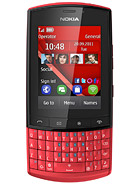
Nokia Asha 303As MMM has pointed out a few times in recent articles, not every mobile situation will merit the latest smartphone, or the most consistent of connectivity speeds, or even a connection at all. In many cases, specifically when the #mobmin (mobile ministry) focus turns missional, the attraction for mobile devices takes on a different component:

  • Is the device generous with battery life (multiple days)
  • How many SIM cards can it take
  • How easy is the device to repair
  • Is there a memory card slot
  • Is there Bluetooth
  • Is there a FM radio

As well as several other factors related to security, cost of device and service, and multimedia abilities. You can go to a website such as GSM Arena and in using their Phone Finder page, choose a manufacturer, and then according to the listing here, begin to filter models down to getting to something that works for you (for example, starting with Nokia and a price of no more than $200 USD, here’s the results of a search for available mobiles).

Mobile Advance took at look at a few low-end mobiles (these would be described as feature phones) some weeks back. The devices that were looked at (Nokia X2-02 and Samsung Hero E3213) consider the above points and more – for those persons doing missions work where mobile connectivity is a near-necessity:

My wife and I both needed phones upon getting here.  After  testing out a few in the stores, we decided to get two similar, yet different models- the Nokia X2-02 and theSamsung Hero E3213. Both cost the same- approximately 64 USD. I thought I’d send on our observations upon using both phones, especially since one of them is the update of the XpressMusic [mobile which was a past recommendation]…

Read the rest of  A Comparative Review of Two Mobile Ministry Ready Feature Phones at Mobile Advance

Mobiles like these can be purchased from websites such as Amazon, Expansys, Carphone Warehouse, and Wallmart. Depending on your region, you might also find some smaller local wireless retailers selling these or find listings for some of these mobiles on sites like eBay and Craigslist. Lastly, a good place to find a mission-ready mobile is a pawn shop. Regardless of the place you find these, make sure that you wipe the device completely, then do a full system restore using the accompanying PC/Mac software suite if available.

Once you have gotten the mobile cleaned up, and before you start adding your favorite or needed contacts and apps, take a look at the listing of security and privacy apps listed over at SaferMobile. For many of you in missions, it might not be your mobile that you need protected as much as it is the communications on it, or the lives of those whom you might also let access your device. Take a look at SaferMobile’s listings, then pursue wisdom in your missional mobile activities.

The Data Hype Disconnect

Given the missional focus of much of the MMM audience, connectivity is something that we hear of often. In fact, it nearly becames one of those agree-to-part-and-disagree arguments when people in mobile ministry from a missional perspective get around those folks who were missional but in more connected/mobile regions. Indeed, its a challenging topic, and for many in ministry, its the kind of discussion that makes you assess what you are really capable of tackling versus what we normally declare as a goal of our efforts.

So, its always nice to see in the wider mobile discussion a talk about the real world experiences of mobile connectivity and the challenges that many devices and services aren’t so up-to-the-challenge in meeting. Here’s a snippet:

…Travelling from small town to small town in Devon, Somerset and Avon in the UK, I’ve been keeping track of the mobile connectivity available. We’re not talking a few sheds out in the countryside here, we’re talking towns of a few thousand people at minimum – and I’ve only seen a 3G symbol on my smartphone once … for about ten minutes. The rest of the time it’s been EDGE data if I’m lucky and GPRS as the most common means of getting online. In some villages, there was zero cellular signal (on both of the networks I had SIMs for) and thus not even GPRS. Nothing.

Yet the data speeds being talked about (and assumed) by the cellphone industry, from adverts to spec sheets to product launches, are in the order of ten times faster, sometimes even as much as a hundred times faster (LTE versus GPRS, for example!) That’s quite a disconnect from reality…

Read the rest of The Smartphone Data Hype ‘Disconnect’ from the Real World at All About Symbian

Having acknowledged this, we can be a bit more realistic in our approaches to serving mobile and other connected devices. Its often the perspective that Wi-Fi isn’t used much, but as Dean Bubley and others continue to show, Wi-Fi isn’t just a preferred method of connectivity, its one where much more is happening than what is being tracked. Then there’s SMS – and we don’t need to continue to beat that drum (it beats for itself just fine), but SMS doesn’t require a data package (neither does MMS), and in some cases are more than suitable enough for engagement activities where some text and data needs to be transferred and there’s little to no room to teach someone a new behavior (great case study from our partner Mobile Cause on this kind of scenario). Then you have person-to-person (p2p) methods such as Bluetooth file/message transfer which are usable, a good bit more secure than the former methods, and in high usage (antecodal evidence; Evaluation of Android P2P PDF, Bluetooth Usability Metric Whitepaper). And finally, not everyone has a smartphone – you’ve got to design your services for the best reach, not just the upcoming (because how often is it that you upgrade to the latest capability of device/car/service/etc).

Connectivity isn’t a guarantee. Depending on the purpose of your application or service, you need to pay close attention to the contexts people will be utilizing their device, and the expectation they will have towards whatever it is you built that you have deemed relevant for their intersection of faith and technology.

All Books Project Update

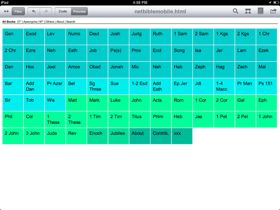
At the end of 2011, we started a project called All Books as an exercise in developing a Bible reader interface that was based around a spatial oriented UI than the normal list/task UI scheme. As the year has progressed, development has as well. There’s been some healthy learning about the limitations of using the Nokia Web Browser on my N8 as the baseline for this. Some lessons towards JavaScript and what works efficiently and what doesn’t. And a few more lessons here and there.

At the end of last month, I got around a Windows PC and was able to send to GitHub the updates that have been pending for the All Books Project (as of right now, I’ve not seen a solid GitHub app for the iPad that works with the web developer app Textastic; open to recommendations). So, if you aren’t watching that repo, I would recommend that you take a look at All Books on GitHub and download the update. Here’s the summary of the updates

UI Updates:

  • added HTML5 local storage for usage stats (needs fixing)
  • fixed a number of books which had incorrect URL pointers
  • fixed issue with navigation where stats wouldn’t hide
  • fixed issue with navigation where clicking on All Books from OT hid OT books instead of keeping them seen
  • shortened text on Reset Stats button

CSS Updates:

  • added CSS for stats area
  • added text-ellipsis for buttons

Now, remember, All Books is just a web-based interactive container (HTML5, jQuery for JavaScript, and CSS3). The content that I am feeding to this comes from Bible.org and several other sources (noted in the UI About section). You can pretty much take any directory of HTML documents that are Biblical in content and point this UI to. No, its not as clean as Browser Bible, YouVersion, OliveTree, and the others. This is in part by design. In order to know what works and what doesn’t you’ve got to sometimes get into things and build it yourself.

That said, All Books is also designed to be a gift to the folks at Bible.org. They have an excellent HTML package of the NET (New English Translation) Bible, but the HTML interface for it wasn’t the easiest to use on tablet and mobile devices. All Books answers that interface question, and sets the ground for the kind of interface that (when scripted) can easily translate across languages and levels of literacy. So to that end, I hope the Bible.org folks can appreciate these and keep pushing the Gospel forward.

If you have comments towards All Books, or would like to contribute to the project, visit the All Books Project on GitHub and just jump right on in. As for me, there’s an upcoming update to my Nokia N8 which might help performance issues, and finally get me on ball to some of the next features for this.