Monthly Archives: September 2012

Syndicated at FaithVillage

Earlier this year (and yet another conference), MMM got a chance to hear from the creators of FaithVillage about their goals for their platform and community. One of those things that you tend to find out in meetings like these are the synergies that exist between ministry efforts and there was certainly some with MMM and FaithVillage. To that end, we’ve partnered with FaithVillage to syndicate some of our content as an official Content Partner. A little more than simply adding our RSS feed to republish content, the Content Partner is more like featured articles that accent the intentionality of the FaithVillage mission and fosters a maturing community interest on a subject.

The first item published was a piece where we challenged the idea of doing mobile than a mobile app or mobile website:

Your mobile device has a camera, speaker, microphone, ability to record audio and video, compose messages in a memo or in a text/email app, receive/make voice calls, send/receive DMTF codes . . . whew. You get the drift. And, if you are like me, your mobile probably does a bit more, like HDMI or composite video output, an FM radio receiver and transmitter, a memory card slot, can attach to USB accessories like portable hard drives, memory keys, has the ability to receive files via Bluetooth and Wi-Fi, or can send multimedia content (DLNA, AirPlay, etc.) to a media center device.

There is a lot happening within that little device, and you have to constantly not just consider what it is that people think is the default of what they want to do, but also consider that there are many other screens pulling on their attention spans.

If you want to be noticed then your approach has to be distinct.

You can read more of our syndicated items under the Technology section of FaithVillage’s featured articles.

If you aren’t a member of FaithVillage, and have been looking to add another quality social media stream into your life (or perhaps, you are one of many wanting to leave Facebook, but want to maintain rich connections with friends and opportunities), then I’d definitely steer you towards FaithVillage. There’s a lot within the community there, and at the very least, you know that there’s at least one familiar voice on the other end waiting there also to connect with you.

Connect with the group Mobile Ministry Interests, or connect directly with Antoine at FaithVillage

Mobile Ministry Made Easy: A Simple Guide to Begin or Advance Your Use of Mobiles

Amazon Kindle Touch in hand
Previously posted at Mobile Advance

Several months back [Mobile Advance] was contacted by a friend in the Southern Baptist International Mission Board (IMB) and asked if [Mobile Advance] could collaborate with one of their workers who was developing a guide to mobile ministry.  I happily agreed and read through the first draft, providing feedback where I thought most helpful.  Last week, a number of months after receiving the initial draft and after working through several further drafts, I was blessed to be given the opportunity to make the first public introduction of the final edition of Mobile Ministry Made Easy: A Simple Guide to Begin or Advance Your Use of Mobiles at a missions conference I was speaking at in Europe.

I am exceedingly happy to be able to make this 40 page guide available to you today and trust that the advice and experience you find in this guide will help you in successfully implementing mobile ministries in your outreach.

Many thanks to the IMB and to “Stan” (not his real name) who put many many hours into not only getting the best information together but also putting it together and formatting it in a way that makes the guide a pleasure to read.

AirStash

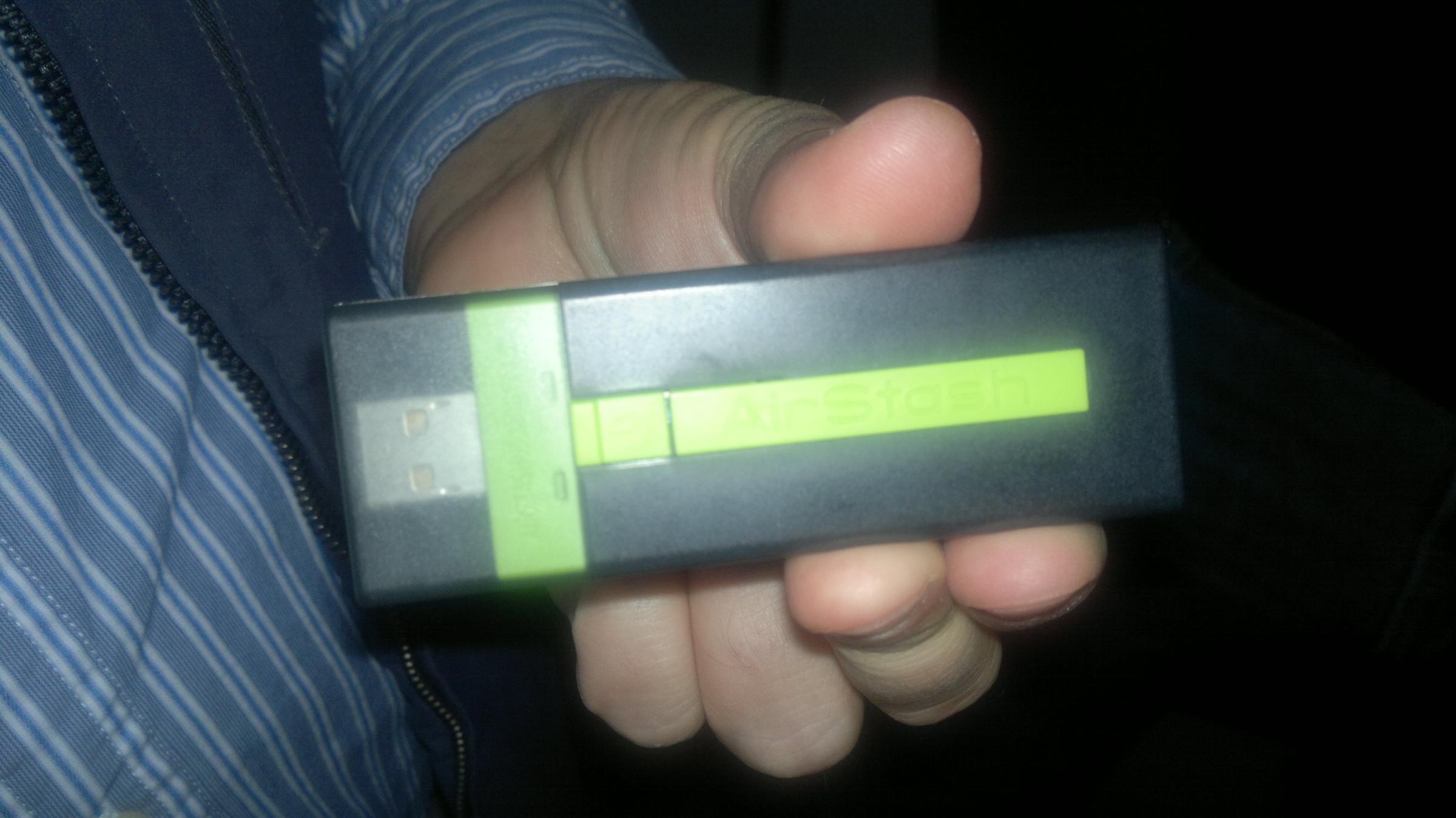
AirStash as seen on airplane flight

When on my recent trip, there was that really neat point where you are told that you can turn on your wireless devices. As usual, I take a look at any Wi-Fi options which might be available and noticed that there as a network running that looked a bit unfamiliar. Because the flight was a long one, I stood up, looked around, and noticed a person with a blinking USB device nearby on their tray. I asked him what it was and was (re)introduced to the AirStash – a wireless flash drive that is also a pocket media server and SD card adapter. In a literal sense, you would be carrying a pocket media server, able to stream or download up to 32GB of content, to anyone who has a WiFi-enabled device.

I will admit, because I use a Nokia N8 and 1st gen iPad, I started to get some ideas. But, I’m already able to duplicate what the AirStash does using my N8 and JoikuSpot (am a special case, I know).

AirStash does have a neat ability though for many folks who might be moving to a mobile device that doesn’t have a lot of internal space, or from a device that has a memory card to one that doesn’t. You end up with a place to archive the old content, and a means to share it for others no matter their device. AirStash as not just a personal media folder, but one that could easily come in handy during family and community gatherings.

Just A Phone

sketch by Antoine RJ Wright, sketchnotes.antoinerjwright.com, via Dropbox
During my recent trip to Helsinki, one of my friends asked me if it really is possible that someone could do all of their necessary computing (re: live) from just their phone. They cited things like needing a larger screen for movies or games, and just the general discomfort of having much of what they interact with happening on a 3-5in screen.

Well, you kind of know my answer to this line of questioning. But, I wanted to open it up here as there was a conversation on another website which also brought this topic to light that reentered my view.

The perspective of computing where I am from (USA and middle class) is that there are more and better screened options to do various types of computing. There’s the automotive dashboard or cylcing computer for transportation. There’s the TV for home media viewing. There’s the mobile and tablet for personal media viewing, gaming, and creation. There are tablets made for collaboration. And other examples. Given all of those available screens, it is easily the assumed practice to master each of those interfaces within their specific domain because they are available to you. When you don’t have (or want) a TV, you morph the smaller screen of a mobile, understanding its limitations and using a few of its benefits (sitting in bed with your favorite programming on-demand-style).

However, I chose to go about computing differently, and hence the question from my friend. Clearly, they were impressed that I could do so much from a mobile and tablet. But, they had very little context of what it meant to go about computing when the mobile was the primary or only means of doing life-by-PC. One of our friends on the trip was from an area where the majority of people didn’t have access to much more than a mobile and perhaps a radio or community TV. They could see how my lifestyle choice lent me a perspective into how they lived a bit more than some other commentators on mobile. And that’s really where this article, and conversation topic comes from. They said simply, if I had the choice to live mobile-only, but there was more, most people would chose the more instead of the only. With many not able to make that choice, sometimes, we have to consider our brothers and do our best to see through their eyes – was my response to these.

And so I’ll put the question to you as it was put to me. Could you see a situation where you had a mobile or tablet as your primary computer? If so, what challenges would you run into personally, professionally, spiritually, etc.?

Next Media Tech: AR

One of the questions that I have entertained in the past year has been what comes after mobile. Not that everyone is getting in deep with mobile, but because some feel they have missed the boat and want to make sure that for the next thing, they are ahead of the curve. Well, I will give you one hint as to what will come next:

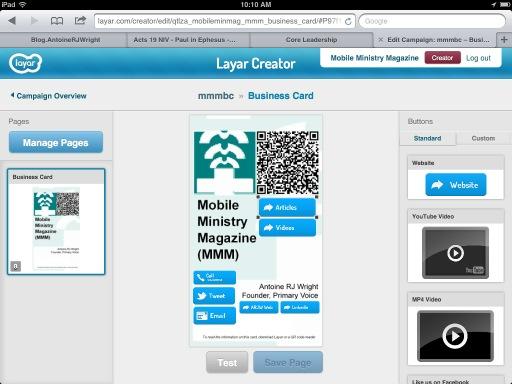
Screenshot of MMM using Layar Creator

AR (Augmented Reality)

Those people who study media and communications have determined that there are 7 iterations of mass media communications which has occurred already in the course of human history. The 7th of these is mobile, the 8th was discovered not too long ago, and Tomi Ahonen describes it nicely.

AR is something that is coming. You can be forgiven in part for holding off on it before looking at getting into it with products such as Layar, Vuforia, and Aurasma. Or, you could be on the list for Google’s Project Glass, just waiting for it to get into your hands before you figure out what exactly it is that you can do with it in order to point people to some aspect of the Gospel that you expressly engage this world.

But, if you wait until it gets here, how do you react to a situation such as the one proposed in the concept video Sight. If social situations could be attended to like a game, or intuition and social savvy reduced to how much someone is willing to share or dig up from a database, or that life’s art and decoration are nothing more than something in our singular eyes alone… could you stand to wait until it gets here before you begin addressing the core components of its implications?

I wonder what an AR-enabled Mobile Ministry Video will look like… or rather, will I just go create it and see what happens.

Archives: Publishing’s Future

A few years ago, we ran an article looking the future of bible publishing thru the lens of a new commentary series Logos introduced:

…Or, will this have the negative effect of leaving access to content only to those who could afford it (device, data connection, subscription to Logos, access to commentary)? Will denominational affiliations curb the use and promotion of such content because while the content is malleable, people aren’t being taught how to critically think and compare in the midst of it?

There are a number of questions that this move to a digital-first offering brings. But, we’d be remiss to not pay attention to the paradigm shift. The Evangelical Exegetical Commentary and Logos are taking a huge step in doing this, and in my opinion, this should eventually be creditable for all. There are questions to be answered, but these are better met head-on, rather than in reaction to the change that’s already happened…

When you think about where we are now with Kindles, self-publishing services, iBooks, and such, its one part amazing, and another part unsettling isn’t it?

Apps, Services (and Skills?) for Serminaries

BibleWorks, Logos, and Accordance logo compliation
If you’ve been following along via Twitter recently (@mobileminmag), then you might have seen a few tweets in reference to articles posted at one of our favorite sites – Biblical Studies and Technological Tools (BS&TT). Certainly one of the oldest and most theologically grounded tech websites, BS&TT, there’s always the kind of content there that gets you to the point of readily applying tech in faith. Of note, a recent post took at look at a few applications relevant for the seminarian, but left also with a standing question about how other seminaries approach making the decision about which application(s) prefered for students’ learning. By the end of this piece, I questioned if its really an app (or service) that seminaries should steer towards, or should the skill of knowing how to build a Bible app be included into the curriculim.

Apps and Services for Serminaries

The BS&TT article mentions these, and we’ve added a few others from previous discussions:

These are only a few of the applications available. Check out our Bible apps page for a more exhaustive listing for several computiing devices and contexts.

Or, Should Seminaries Focus [Also] on Skills to Build the Ideal App/Service?
As mentioned earlier in this article, the BS&TT article left me with the question of “what specifically are these apps doing that is necessary to the study of, application to, and teaching of Scripture?” When I looked at it through this lens, the approach wasn’t that a specific application should be chosen, but perhaps seminaries should focus on those skills common to these applications. If this focus on those skills becomes the lesson, could it be a better lesson to teach how to build a Bible reader app suitable for use in seminary – engaging into the discussions that can better happen when you are closer to the publishing of the text, rather than the transcription of it?

Here’s my comment as posted with the BS&TT piece:

…Why aren’t you teaching folks how to build a Bible reader?

I understand that some of the issues related to Bible software has to do with not so much the content, but knowing the needed features for instruction, learning, and application. What you seem to be wanting here is some easier or more grounded means of teaching specific ways of using these software packages in studies. That doesn’t happen solely by concentrating on a specific package, but pooling their features, plus the needed skills, into something of a lesson.

If I could make the recommendation in this wise, it would be to take John Dyer and the DBS’s work with Browser Bible, and make that the introduciton to tech and Biblical studies, alongside Hebrew and Greek beginnings. To learn how to program the code that makes the letters appear, how to manage a websites oval website, and see directly the challenge of language support and user in traces, that’s what makes for the kind of core compentencies in the text that transcend just knowing an app or having a specific library.

Plus, you end up with a suite of folks who will know first hand the issues of restrictive licensing and publishing, which is every seminary’s real issue with the text as taught.

So, instead of learning the user interface as Logos/OliveTree/etc have designed it, you are learning how to build one that fits your contexts or concepts of learning. For example, with the base of HTML, CSS, and JavaScript, you could address the lack of non-English resources as you learn the

This is one of those discussions that ends up having two questions knit together:

  • What are some of the computing apps and services found to be helpful for those of you in seminary?
  • Should seminary policy focus on apps and the core skills between them, or the core features of using tech tools for Biblical studies and knowing how to build your own ideal environment?

I admit, this is a challenging topic. But, probablyh one worth having over the larger expanse of the wants and needs of techn tools for faith.

Keepin Up with Mobile Ministry

We are a bit late with today’s post. But, late doesn’t necessarily mean that there is nothing worth talking towards.

One of the ways in which we encourage you to keep up with, and even add to, the discussion about mobile ministry is to check out the twitter hashtag #mobmin. Tweets containing the hashtag #mobmin cover everything from stats, to trends, to opportunities, to matter-of-fact items. In addition, other websites similar to MMM will use the #mobmin hashtag when they post items on their websites, Facebook, and other sites. It’s a great threading term.

Another way of keeping up with mobile ministry is to check out the MobMin.Info portal page. MobMin.Info points to websites, videos, discussions, and topics relating to mobile ministry. And does so on a page formatted specifically for mobile devices. One of the latest sections added has to do with mobile ministry videos. It’s really a solid and powerful display of what’s possible with mobile ministry. And if you are looking for an easy template to use for getting started with your mobile landing pages, the source code of the page is easy to read (with implementation supported via Modernizr and jQuery).

Lastly, check out the Mobile Ministry Forum (MMF). The MMF is a partnership of several ministries who are doing mobile ministry in various forms. Some are classic missions organizations pressing into web and mobile; some are development and business as mission organizations; some are media companies in various stages of engaging mixed-modal societies. Seriously, really neat stuff happening. Along with a yearly conference which gathers to talk about mobile ministry, ignite partnerships, and display progress in the space. As a matter of fact, the next conference is upcoming. Check out MMF for more information and to register.

It’s Sunday, and I am sure that’s enough to getting you started. Do you have websites, authors, or personalities that elp keep you up to date with mobile and other technologies relevant to ministry? If so, drop a note in the comments below, or tweet it using the hashtag #mobmin. There is much we can continue to learn and share with one another.

Faith’s Interface

The Brick (lego) Testament - Exodus and the 10 Commandments
Another one of the reasons why the All Books Project has been beneficial is in the discussion about interfaces to faith. Specifically, how the tools we use within our faith – these can be sacraments, behaviors, doctrines, as well as computational helps – give us an approach to our faith which may or may not be something that can resonate with others. Where we might esteem one method or another, or one tool or another, but that doesn’t mean its the last answer on the topic. What’s interesting though is how the idea of interface begins to play out within the space of having and manipulating content on the screens and keyboards of our mobile devices. If these devices and their content are viable, then we should see them actively drawing one another closer to God. If not, then they are an interface that causes the wrong kind of friction… one that should probably be removed.

Over at the website The Cooper Journal, there was the reignition of the discussion about interfaces and how when interfaces into actions or events are not well thought out, we end up with expereinces that degrade the impressions that we were to get from them. I liked the quote that was near the beginning of this, because when it comes to mobile ministry (#mobmin), I think we sometimes lose sight of this in the midst of making sure that we are mobile and are doing/performing/proving ministry:

As Donald Norman said in 1990, “The real problem with the interface is that it is an interface. Interfaces get in the way. I don’t want to focus my energies on an interface. I want to focus on the job… I don’t want to think of myself as using a computer, I want to think of myself as doing my job.”

When I think about the effect of this tech as a tool and enabler of the faith, I honestly start from this end. I don’t want to think of my faith as “ooh, I have a Bible app, now I can engage God as I should in this age.” I am learning and beginning to feel that if the faith doesn’t make Emmanuel (“God with us” – Matthew 1:23, Isaiah 7:14) more palatable to living, then its probably something that’s getting in the way of faith developing as it should.

For faith’s interface, I’m constantly reminded that the Israelites had a chance to have the simpliest of interfaces with God, but then chose to have Moses speak and entreat God on their behalf (Exodus 20:19). They chose a system of building a relationship with God where there was an additional 50 chapters of legal documents needed. A system that all parties agreed was flawed, but that one party only wanted to get rid of (God, who does this through Jesus’s death and resurrection).

I restate Norman’s quote, I don’t want to focus my energies on keeping devices charged, keeping content updated, worrying about where my email address might be going or be sold to. I want to focus on living a life that looks like it was gifted from Jesus Himself. I don’t want to think of myself as using this tool or service as my faith, I only want to be in the posture and position (Colossians 3:1-4) of living such that it looks like Him (Matthew 5:14-16).

I don’t believe that the work that’s done to build these computer tech tools and services for minsitry are evil. I don’t think they are the measure of our faith’s maturity either. I’m drawing close to God because of and in spite of these tools. We had a similar discussion in the past about sacraments – if they increase the tension that we have at making and keeping a relationship with God, then they are of no good use. But, if they bear witness of our maturing into the fact that God is with us, then let us use them to His glory and not our own; loving and esteeming one another… spurring one another unto all good works.