For the past year, I’ve essentially used coffeeshops all over NC, VA, PA, as well as my car seat and several residences as office places. And for the most part its been a good challenge to have a consistent routine no matter where I plant myself for an “office” moment. That said, it took a little while for me to get out of the mindset that I had to have “an office” as much as I just needed to make sure that I had enough space in the day to get done internal, collaborative, and community tasks.
To that degree, mobile has been a great enabler of “office anywhere.” I’m only limited by whatever software I have on the device(s) that I choose to carry and the amount of power that device has. I’m pretty much at the point now where working anywhere is a matter of discipline not technology.
That said, I’ve got a question to many of you whom are pastors, missionaries, etc. who might be grappling with that decision for having an office to do “ministry” and “admin” work? If you’ve got the laptop, mobile, and software to work anywhere, what stops you from making anywhere your office? Is it a matter of the office environment being needed so that you can focus better, or, is it a fear of letting go of previous accompaninments that might not be helping you to do ministry or admin at all?
Many of you might have seen the news last week, and for those of you who didn’t, please consider this a really small summary – Amazon released a web-based version of its Kindle application last week. Unlike the previously existing effort where you would be able to read your Kindle books in a PC/Mac web browser (Chrome, IE, Opera, or Firefox), Kindle Cloud (accessed by going to the URL https://read.amazon.com/) is designed so that mobile devices with HTML5-compatible web browsers – currently the iPhone and iPad Safari Mobile browsers – are able to essentially work similar to the Kindle application.
In a very simple sense, you don’t need an application to read your Kindle books. And outside of the initial connection, you don’t even need to be online as you can utilize the feature of HTML5 local storage to read selected books when offline.
Sound great right? Well, its a jump ahead for sure, and with many analysts predicting that there could be over 2 billion mobile devices with HTML5 browsers by 2016, it would seem to speak more relevance to the days being numbered for native applications.
Now, I’ve moved to using Kindle Cloud Reader and have to say that with the exception of page animations and copy/paste, I really don’t miss the native app much at all. Its good enough for my needs, and considering that I normally am using my iPad in a connected setting (I have a WiFi-only iPad), its not a bad idea to use for this kind of application.
So here’s the question, and the implication that people are going to ask if more applications go this route – what Bible readers are conductive to this approach? Are Bible readers conductive to this approached?
Many Bible applications have taken the approach to having a native application that has some Internet connected pieces (Facebook/Twitter sharing, downloading on-demand, backup, etc.). Would it make sense at some point in the near future for them to go the route of HTML5-like web apps like Amazon’s Kindle, Financial Times, etc. are not simply niche publications that are trying this, they have considerable followings and in many cases people willing to pay for increased access to greater depth of content and coverage – its literally a similar palette.
If this begins to happen in critical mass – given Apple’s rules for subscriptions with iTunes, Android’s fragmentation concerns across device types, and increasingly cheaper connectivity options for some mobile users – will your mobile Bible/religious publication approach stay with a native approach, or go this route? Will your users care and stay with you or move to someone else, even if it means they lose your support or content offerings?
Well, it was an unexpected and needed time away from the writing/working aspects of MMM this last week, and therefore the Twitter timeline and RSS feeds got a bit filled some some interesting notes. Here are a few items that we made sure to star for later conversations:
Church Mag: Clips is an iPhone/iPad application that enables small group leaders and Bible study teachers to use clips of movies for a teaching aide. Really neat project and one definitely a bit more than the conventional Bible app.
ReadWriteWeb: UCLA is offering a course in Digital Humanities. Not the first time we are seeing a course offering like this, but this is one that evangelists and missionaries might want to take a good look at this offering.
MobiThinking: Recently, Barcelona was declared as GSMA’s Mobile World Capital. In this article, MobiThinking takes a look at what makes up the DNA of a “mobile world capital,” and how some of these lessons can translate to other cities, regions, and mobile-infused industries.
Carnival of the Mobilists: The 251st Carnival of the Mobilists has been published at Mobile Web Company. Lots of insightful readings from around mobile. Be sure to have your submissions ready for the next submission time. Follow @COTMobilists on Twitter to be up to date on the next submission time.
Mobile Groove: Also in the Twitter-like mindset, Mobile Groove is taking the #FF (Follow Friday) format and turning it into an interview series. Catch up with the latest interview and if you are involved with mobile in any aspect, see about getting on the list to be interviewed.
MeeBible: For those interested in lending a hand to an open source Bible application that looks off to a great start, MeeBible for MeeGo and MeeGo Hamarattan devices is underway. Check out the project page for more information and to join in the effort.
Aaron M. Carter: There’s another great article out there talking about using iPad devices in pastoral functions. Check out Aaron M. Carter’s iPad for Pastors article. Great tips and apps noted here.
WIP Connector: There’s an open survey that’s aggregating research for successful mobile applications over at WIP Connector. Please offer your responses as this contributes to a larger research project on successful mobile application development.
TED: There’s a conversation going on where a TED Fellow is looking at the effect of mobile internet on emerging economies. The conversation is open for a few days longer, so do check it out and contribute your insights.
There’s been more, and we’ve tweeted some. Stay tuned this week as we get back into the regular flow of things, and crack open some of the lessons learned in a (forced) vacation.
One of the things that I like about many Roman Catholic and Eastern Orthodox churches – that is, the really old ones – is the purity of form and function. Everything from the stained glass to the arrangement of the seating, to even the weight of the doors, conveys to you some sense that you aren’t in a normal space. And of course, I’m always smiling when I see a sign asking people to please put their mobiles on silent when even visiting. Sound carries, and its jarring to the environment when something breaks that experience of those forms and moments.
In much the same way, I look at augmented reality (AR) as a step towards reclaiming some of that purity of the forms and environments around us. AR is a technology that utilizes the camera, GPS, Internet connection, and sometimes even surrounding sounds, to augment the view in front of you with a digital layer. This layer could be something as simple as a compass point for directing you to a destination, or could be more involved such as a game board across which two people are playing a game that can only be seen through the screens on their mobiles. In any effect, there’s an attempt to not litter the visual space with marketing or other data, but to leave your ability to see it as part of the treasure.
Recently, a company that specializes in AR technologies – Layar – released a new product called Layar Vision. From their website:
Layar Vision allows the creation of layers and applications that recognize real world objects and display digital experiences on top of them… Layar Vision uses detection, tracking and computer vision techniques to augment objects in the physical world. It can tell which objects in the real world are augmented because the visual fingerprints of the objects are preloaded into the application based on the user’s layer selection.
So, you in effect get something that’s a step beyond what we’ve seen with QR codes and MS Tag – there’s a recognition of objects in the real world, and then on top of those objects is something additional, something digital. In just watching the video, it seems pretty neat and something that could come in handy in some situations (though, if I had a computer in my glasses, I’m sure that I’d be using this like a fighter pilot uses their heads-up-display).
Now, about those churches and environments. Some more modern churches (than what I referenced earlier) have a different simplicity to their designs. Sure, there is this “Apple-like ethos” about the with gradients, lighting effects, and the occasional whiteboard with something scribbled on it near an office door. But, generally speaking, the worship space looks cluttered. Could AR technologies like Layar Vision point to a different using of the space than what we do now?
For example, imagine that there was a small group that wanted to meet on the beach for a concert. However, the performer was actually doing the concert overseas. Those who had the URL would be able to enjoy the concert as many would a YouTube video now, passively watching. Or, they could take a route with Layar Vision where they’d go to a specific spot on the beach and then the concert would be “projected” in front of them seen only through their mobile’s cameras, but able also to be listened to through their headphones. And depending on where they were standing, they’d experience the concert differently. When a certain number of people congregated to the same spot for this, a digital sign would appear over their heads, again, only viewable by Layar Vision or something similar. You’d have people enjoying a “silent” concert, but a means for people to find out what’s going on and even join them.
Now, I could imagine the reaction to this scene. It would probably look a lot like the reaction that the apostles received after that incident with the flaming tongues and them talking a bit differently than normal (Acts 2).
AR, at least how it can be looked at, gives us the ability to see things differently, and probably get back to appreciating environments and forms that we would normally find littered with much visual distractions. We might be a ways away from a scenario like the above being normal, but I do wonder what we’ll see when we do get there.
Over at Mobile Advance a new interview series called 10 Questions. Here, Mobile Advance interviews people involved in and around mobile ministry activities.
The latest of these interviews is with Brad Rhodes (MAF Learning Technologies). Here’s a snippet of that interview:
6. What is one recommendation you could make that would help an individual or ministry be better able to move forward in mobile ministry?
Focus on voice and video even if a large percentage of your audience has smart phones. But remember that video is much riskier to use cross culturally…
This infographic was put together by Android Tablet Fanatic by aggregating publicly available data sources. For those of you looking to travel, these are some of the costs that you’ll be looking forward to. Click on the image to view it full-sized.
Whether you are traveling domestically or internationally, check out the latest pre-paid rates and keep those data costs in mind.
Mobile Active is one of the premier spaces on the Internet to find out what’s happen at the intersection of mobile technology and social movements. They are often releasing case studies and projects based on their findings at this intersection. Their most recent release is the Mobile Media Toolkit. From their release:
The Mobile Media Toolkit helps you make sense of the growing role of mobile tech in media. The Toolkit provides how-to guides, mobile tools, and case studies on how mobile phones can (and are) being used for reporting, news broadcasting, and citizen media. We cover it all, from basic feature phones to the latest smartphone applications.
The Mobile Media Toolkit is designed to give guidance to those involved as professional or citizen journalists, or engaged in media development or news/media organizations as to how mobile is being used and some of the practices that are developed as its being used in various social engagements.
This isn’t just a listing of case studies either, the Mobile Media Toolkit takes your through creating content on your mobile, sharing mobile media content, delivering content to mobile devices, engaging mobile-enabled audiences, and even securing your content. There are several How-Tos posted which would enable you or your organizing to just jump right into mobile (if you will, getting some use out of some of those mobile features you might always use).
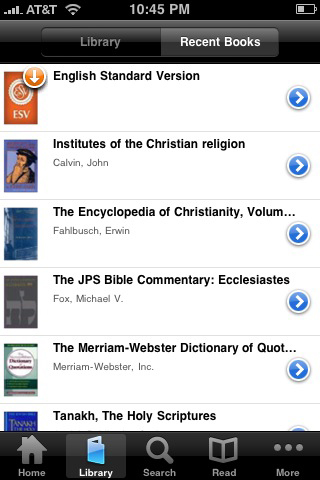
We come down pretty hard on Bible apps here at MMM. Either they aren’t focused enough, or they have so many features that people get lost in using them (a product focus issue). Nevertheless, there’s always room to talk about what they do well and what can improve from there.
What Mobile Bible Apps Do Well
Its well agreed, even when comparing leading Bible apps to other eBook readers/applications, that Bible applications are well developed for their target. From the handling of notes, to offering different views to compare content. Bible apps seem to run in the lead in respect to having the kind of user experience (UX) that is responsive to many of the needs of the Bible reader.
Footnotes, cross-references, and some even integrate image support better than you’d see on the Nook, Kindle, or other electronic reading devices. Add to that, an large body of content (usually priced appropriately), and you basically have a niche in mobile Bible apps that can pretty much sustain itself – for a little while longer at least.
And then you just have availability. Just look at our Bible apps listing – there’s at least one Bible app (and therefore several Bibles and other religious literature) available for nearly any mobile device. There are even SMS and audio-only options for those folks that would prefer something a bit more responsive to those reading and learning styles. I’ve been around mobile devices and software for a very long time, I don’t know of any genre outside of games that covers such a diverse range of devices and usage types.
What Mobile Bible Apps Don’t Do So Well
Where mobile Bible apps falter, and this is true for just about anything attached to the publishing world, is in two specific areas: access and consistency.
In respect to access, we still have the situation with Bible applications that content is locked to specific applications. Though we are getting better with this – just recently, we saw the release of Simple Bible Pro for HP webOS devices which uses Laridian’s licensed content. Instead of a situation such as a single vendor needing to making an application for (and then support) various mobile platforms, another company has made the application, and there was some cross-licensing able to be done here. This doesn’t happen enough, and therefore Bible software companies are dealing with access the hard way – building platform-centric silos. And in most cases aren’t even taking advantage of respective platform strengths when doing so.
Then there’s consistency. I’ll let Kevin Purcell from Christian Computing Magazine take it form here:
…While all of these are good apps, they have one thing in common. They lag behind their iPad/iPhone counterparts running on iOS in features and sometimes in stability. Let’s take Olive Tree Bible Reader as an example. The iOS version is rock solid and has a lot of great features. It has split screen capability and markup features like book bookmarks and notes. The most recent stable Android version only recently added some of these features, but not all of the iOS features are present yet. Logos has a good iOS app. They haven’t even re-leased an Android version yet, but do have a public beta (see link above). Their beta is little more than a book reader. You cannot compare translations, there is no Passage Guide or Word Study Guide and like the iOS version it has no note taking feature, bookmarking or highlighting. Laridian’s Android app is an alpha, not even a beta. I downloaded it and they have a great start, but it is definitely missing most of the great features of the iPhone version…
Feature parity is important whether you are doing simple reading, or diving into a more in-depth study with your community. This aspect really hits folks who move to another mobile device and have gotten used ot a specific feature.
How Then to Raise the Bar
This is the part where you make the call. Being that mobile Bible apps have this base, where do they need to improve or become better in your perspective? Let’s hear what you have to say, and maybe the voices can get some of these excellent companies to consider tweaking their offerings in that direction.
 For the past year, I’ve essentially used coffeeshops all over NC, VA, PA, as well as my car seat and several residences as office places. And for the most part its been a good challenge to have a consistent routine no matter where I plant myself for an “office” moment. That said, it took a little while for me to get out of the mindset that I had to have “an office” as much as I just needed to make sure that I had enough space in the day to get done internal, collaborative, and community tasks.
 Many of you might have seen the news last week, and for those of you who didn’t, please consider this a really small summary – Amazon released a web-based version of its Kindle application last week. Unlike the previously existing effort where you would be able to read your Kindle books in a PC/Mac web browser (Chrome, IE, Opera, or Firefox), Kindle Cloud (accessed by going to the URL
 ![[Procreate] Walk Under the Canopy - Share on Ovi](http://media.share.ovi.com/m1/lt/3079/1338c410f9b34e608986ddf7c495d781.jpg "[Procreate] Walk Under the Canopy - Share on Ovi")
 One of the things that I like about many Roman Catholic and Eastern Orthodox churches – that is, the really old ones – is the purity of form and function. Everything from the stained glass to the arrangement of the seating, to even the weight of the doors, conveys to you some sense that you aren’t in a normal space. And of course, I’m always smiling when I see a sign asking people to please put their mobiles on silent when even visiting. Sound carries, and its jarring to the environment when something breaks that experience of those forms and moments.

.jpg "Mobile Media Toolkit (logo), via MobileActive")
 We come down pretty hard on Bible apps here at MMM. Either they aren’t focused enough, or they have so many features that people get lost in using them (a